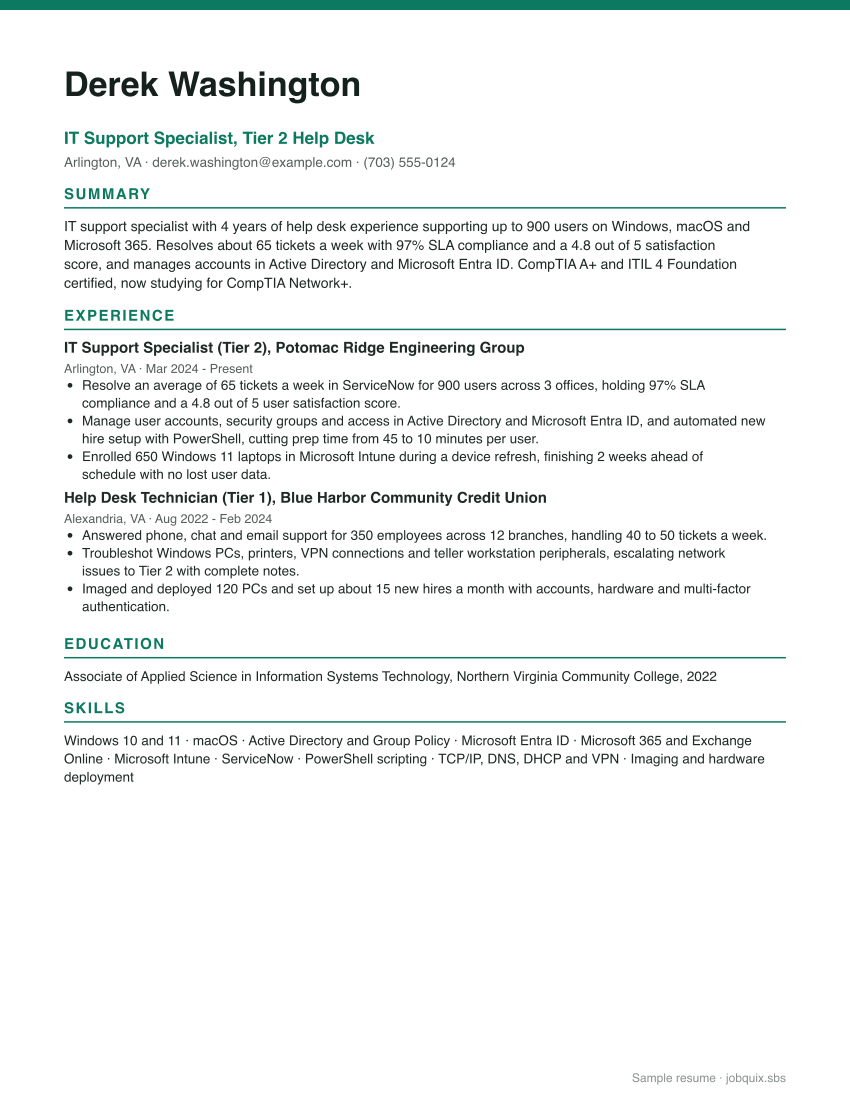
IT Support Specialist resume summary examples
Entry level
Entry-level IT support technician with CompTIA A+ certification and an A.A.S. in Information Technology. Built and repaired 30 PCs in a campus computer lab job and helped 200 students and faculty with Wi-Fi, printing and account issues. Patient explainer who documents every fix clearly.
Experienced
Senior IT support specialist with 8 years of experience leading a 5-person service desk for 2,500 users. Raised SLA compliance from 88% to 98% and cut average resolution time by 40% after redesigning ticket routing in ServiceNow. Experienced with Intune, Entra ID, Jamf and Microsoft 365 administration.
Career changer
Retail store supervisor moving into IT with CompTIA A+ and the Google IT Support Professional Certificate. Served as the store's go-to tech contact, fixing point-of-sale, printer and network issues for 25 employees. Brings 6 years of customer service experience and calm communication under pressure.
Need more ideas? See resume summary examples for every career stage.
IT Support Specialist resume bullet points you can adapt
Strong bullets start with an action verb and end with a result. Swap in your own numbers.
- Resolved an average of 65 tickets a week for 900 users with 97% SLA compliance.
- Maintained a 4.8 out of 5 user satisfaction score across 3,000+ closed tickets in ServiceNow.
- Raised first-contact resolution from 68% to 79% by writing 40 knowledge base articles for common issues.
- Automated new hire account setup in Active Directory with PowerShell, cutting prep time from 45 to 10 minutes per user.
- Enrolled 650 Windows 11 laptops in Microsoft Intune during a device refresh, finishing 2 weeks early with no data loss.
- Administered Microsoft 365 for 900 users, including Exchange Online mailboxes, Teams, SharePoint permissions and licenses.
- Cut password reset tickets by 35% by rolling out self-service password reset and training staff to use it.
- Enrolled 350 employees in multi-factor authentication in 3 weeks, meeting a security audit deadline.
- Imaged and deployed 120 PCs and set up about 15 new hires a month with accounts, hardware and MFA.
- Troubleshot VPN, Wi-Fi, DNS and printer issues across 12 branch offices, escalating network faults with complete notes.
- Recovered $18K a year in unused software spend by auditing Microsoft 365 and Adobe license assignments.
- Tracked and retired 210 aging devices in the asset management system, keeping hardware inventory accuracy above 98%.
- Supported 25 conference rooms with Microsoft Teams Rooms equipment, resolving 95% of room issues within 15 minutes.
- Trained 4 new Tier 1 technicians on ticket triage, documentation standards and escalation paths.
Best skills for an IT support specialist resume
| Hard skills | Soft skills |
|---|---|
| Windows 10 and 11 troubleshooting | Patience |
| macOS support | Plain-language explanations |
| Active Directory and Group Policy | Customer service |
| Microsoft Entra ID | Problem solving |
| Microsoft 365 administration | Clear documentation |
| Microsoft Intune (MDM) | Time management |
| ServiceNow or Jira Service Management | Calm under pressure |
| PowerShell basics | Teamwork |
| Networking (TCP/IP, DNS, DHCP, VPN) | |
| Hardware repair and imaging | |
| MFA and single sign-on | |
| IT asset management |
Match these to the job posting before you apply. The ATS keyword checker shows which terms from a posting your resume is missing, and the skills guide covers how to list them.
Tips for writing an IT support specialist resume
Lead with ticket volume, SLA and satisfaction
Service desk managers measure tickets per week, SLA compliance, first-contact resolution and customer satisfaction, so put those numbers in your first bullets. Add the number of users and sites you support to show scale. Pull the figures from your ticketing system reports instead of guessing.
Name the systems you administer
Write the specific tools, such as Active Directory, Microsoft Entra ID, Intune, Exchange Online, Jamf or ServiceNow. Recruiters and applicant tracking systems search for these exact terms. When a product was renamed, like Azure Active Directory becoming Microsoft Entra ID, you can list both names so you match either version.
Put certifications where they are easy to find
CompTIA A+ appears in many help desk postings, and earning it requires passing two exams, Core 1 and Core 2. It stays valid for three years and can be renewed through CompTIA's continuing education program. List it with the year earned, then add Network+, Security+, ITIL 4 Foundation or Microsoft credentials as you complete them.
Show automation and process fixes
Small scripts and process improvements set you apart from other candidates. Mention PowerShell scripts, knowledge base articles, self-service tools or ticket routing changes, and tie each to time saved or tickets reduced. These bullets also show you are ready for Tier 2 or systems administrator roles.
Highlight how you work with non-technical users
Help desk work is customer service with a technical core. Include satisfaction scores, training sessions you led and examples of explaining fixes in plain language. Retail, call center and other customer service jobs count as relevant background.
New to IT? Add a home lab
Build a small lab with virtual machines, a Windows Server evaluation copy and Active Directory, then describe what you configured in a Projects section. Include tasks like creating users, setting Group Policy and configuring DNS and DHCP. Document the setup on GitHub or a blog so reviewers can see your work.